Fashion Product Page Image Sequence: What Every Photo Must Answer
A practical image sequence for fashion product pages, showing how each photo reduces a different kind of shopper uncertainty.
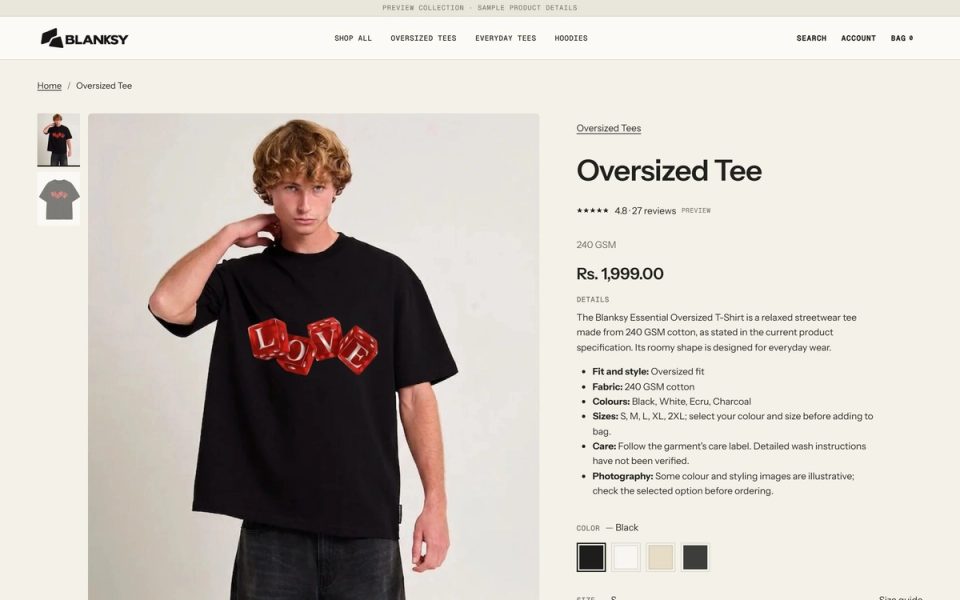
Fashion shoppers do not look at product images only to admire the styling. They use them to estimate fit, shape, material, scale, and the risk of receiving something different from what they imagined. The order of the images helps them answer those questions without searching through a random gallery.
An image sequence is therefore an information system. Each image has a job, and the sequence should move from recognition to inspection to confidence.
Start with the product truth
The first image should make the product recognizable at a glance. Use a consistent crop, background treatment, and scale across the catalog. If the first view is an editorial image, make sure the product silhouette and key detail are still clear.
The next image should answer the most important shape or fit question. A back view, a full-length view, or a model image can do that job depending on the garment. Do not choose the second image because it is visually different. Choose it because it resolves the next uncertainty.
A useful six-image sequence
For a small apparel catalog, I start with six roles:
- Recognition: front or hero view that names the product visually.
- Shape: a full view or alternate angle that explains silhouette.
- Back or construction: the view that prevents an important surprise.
- Detail: fabric, print, stitching, hardware, or another tactile cue.
- Scale: model context, dimensions, or a useful reference for proportion.
- Styling or set: a combination, color option, or real-world use context.
Not every product needs all six. A simple accessory may need fewer detail views and more scale. A garment with a distinctive back or closure may need to move construction earlier in the sequence.
The rule is to assign a question to every image. If two images answer the same question, replace one with evidence the shopper has not seen.
Keep the catalog system consistent
Consistency is not identical photography. It is a shared set of decisions about crop, horizon, product scale, background, light direction, and the relationship between model and garment.
At BLANKSY, the storefront and identity need to work together. A strong wordmark cannot compensate for product images that change scale from one card to the next. The BLANKSY case study shows how brand and storefront decisions meet at the point where the shopper evaluates the product.
Design for the small viewport
On mobile, the gallery often occupies most of the first screen. Make the first image useful without requiring a tap. Keep the image ratio predictable so the product does not jump as the shopper swipes. Use a clear position indicator, and make sure product details remain available after the gallery.
Do not hide the detail image behind a long carousel if the detail answers a purchase-critical question. A shopper should not need to discover that a feature exists.
Pair images with text evidence
Images work best when the product information beside them explains what the shopper should notice. If the image shows a fabric texture, name the material and care implication. If it shows a fit, connect it to the size guide. If it shows a styling suggestion, label it as styling rather than a promised inclusion.
The Shopify fashion homepage framework covers how the same image system can introduce the collection before the PDP. For collection-level consistency, read how to keep ecommerce product photography consistent.
A PDP image QA checklist
- Is the first image recognizable at card size and full size?
- Does each image answer a different shopper question?
- Is the product scale consistent across the catalog?
- Are crop and background decisions intentional?
- Can the mobile gallery show the important detail quickly?
- Do captions, alt text, and product copy agree with the image?
- Are styling props clearly distinguished from what is sold?
The best sequence reduces uncertainty in a calm order. It lets the visual system do conversion work without turning the product page into a wall of claims. That is the practical connection between fashion brand identity and storefront design and the day-to-day experience of shopping.